
Your Mac menu bar,
upgraded.
UtilsBar is a powerful local-first utility hub that keeps your everyday tools just one click away. Built for speed, privacy, and focus.
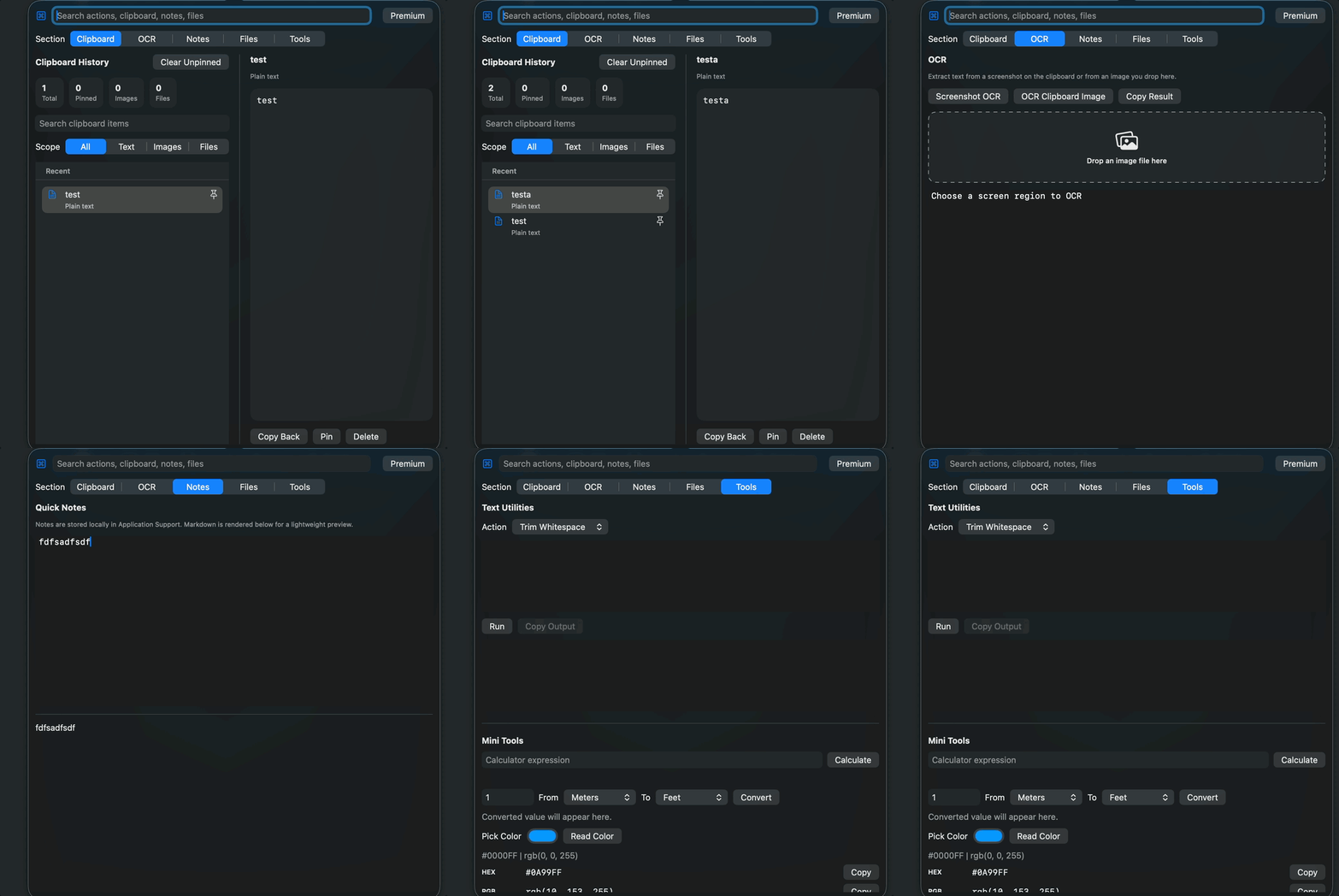
Powerful tools, instantly accessible.
Everything you need for your daily workflow, tucked away in your menu bar and ready when you are.
Smart Clipboard
Manage text, images, and files with search, preview, pinning, and quick copy features.
On-Device OCR
Extract text from screenshots and images instantly using Apple frameworks without any cloud dependency.
Quick Notes
Jot down ideas and code snippets quickly with full local markdown support.
File Shelf
A temporary staging area for files and quick Finder actions.
Text Utilities
Format JSON, encode/decode Base64, change case, and trim whitespace instantly.
Mini Tools
Calculator, unit converter, color readout tool, UUID & random string generator.
Instant access without
breaking your flow.
UtilsBar lives directly in your macOS menu bar. Whether you need to search your clipboard history, extract text from a screenshot, or format a JSON string, it's always just a click or shortcut away.
- Global keyboard shortcuts for instant access
- Lightning fast performance
- Deep integration with macOS frameworks
- Beautiful, native-feeling interface
Three steps to productivity.
Install UtilsBar
Download safely from the Mac App Store. No accounts or signups required.
Access from Menu Bar
Click the menu bar icon or use a custom global shortcut to open the popover.
Use Tools Instantly
Search your clipboard, convert text, or extract OCR data without breaking flow.
Your data belongs to you.
Period.
In an era of cloud-everything, UtilsBar takes a different path. We believe your productivity tools shouldn't be a window into your private life. Everything you do in UtilsBar stays on your Mac.
100% Offline
All processing happens locally on your Mac. No internet connection required for core features.
No Account Required
Start using UtilsBar immediately. We don't collect emails, names, or any personal identity.
No Tracking
We don't use analytics or tracking pixels. Your usage data never leaves your device.
On-Device Processing
OCR and text utilities use Apple's native frameworks for maximum privacy and speed.
Ready to upgrade your
macOS experience?
Join power users who use UtilsBar to stay focused and productive. Available exclusively on the Mac App Store.
Get UtilsBar for macOSRequires macOS 13.0 or later.